Prices
Trading card price checker.
Card AI combines a card price scanner app with catalog search: find the copy, confirm its condition or existing grade, and see the available price history behind the number.
 DownloadApp Store
 Store Link PendingGoogle Play
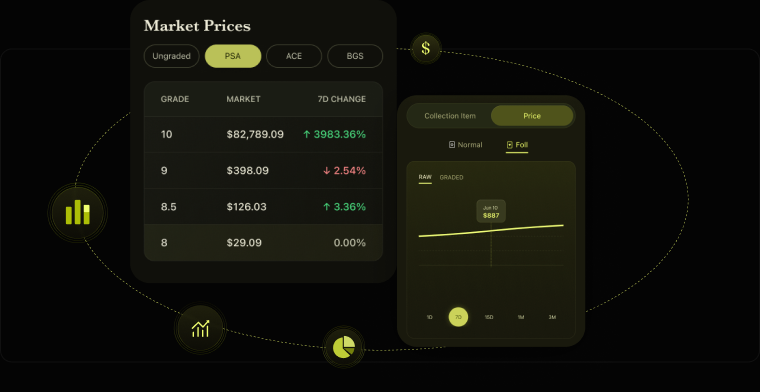
Inspect the price behind the card record.
After you confirm the card, finish, language, and grading state, Card AI shows the available current prices and history. Compare the same holding in the graded card tracker.
Illustrative Card AI screen composite. Values shown are examples; market prices, history, and sold-listing availability depend on the selected card.
One price for a card is usually the wrong price
Asking what a trading card is worth without saying which copy is like asking what a used car costs. The answer depends on the printing, the condition, and whether it has been graded.
Card AI prices the specific copy. Raw cards are broken out by condition, graded cards by grading company and grade, so a PSA 10 and a lightly played raw copy of the same card never share a number.
Price history matters more than the current price
A single current price tells you what the market thinks today. It does not tell you whether that price has doubled over six months or is sliding after a reprint announcement.
Card AI keeps price history and market trends on individual cards, which is what you need to decide between selling now, holding, or buying more.
Two ways to use the card price scanner
- Scan the card with your camera, review the suggested catalog matches, and confirm the printing details
- Run a card price lookup by name, set or card number when you do not have the card in hand
Both routes land on the same catalog record with the same pricing and history. That makes the trading card value app useful whether the copy is on the table or only on your want list.
From price check to portfolio
Checking one card is useful once. The value compounds when the cards you check become a tracked collection with a running total that updates as the market moves, so you know what the whole thing is worth without re-checking card by card.
Because the card price database sits behind every entry, a card price scanner result and a text lookup resolve to the same number.
Price guide, valuation, and sold-listing research
These terms answer different questions, which is why market numbers can disagree.
- A trading card price guide summarizes the available market price for a printing
- A card valuation applies the matching raw condition or existing slab grade to the copy you own
- Sold listings are separate comparable-sale research that collectors may inspect before acting
Card AI shows published current prices and available price history for the selected card record. It does not calculate its market price from visible sold-listing comps.
Tracking prices after the check
Checking a card once answers a question. Watching it answers a better one.
Cards in your collection carry price history, so a card value tracker is built in rather than bolted on: you can see what your holdings did over time, not just what they are worth today. The collection total moves with them.
Related
Card price checker questions.
How is a card price scanner app different from a price lookup?
Scanning starts from a photo and suggests likely catalog matches for you to confirm. A price lookup starts from a name, set or card number. Both routes open the same confirmed card record with the same available current price and history.
What is my card worth?
Select the matching catalog record, confirm its finish and language, and choose a raw condition or existing slab grade. Card AI then shows the relevant market price and available price history.
Why is the graded price so different from the raw price?
Grading removes uncertainty about condition and caps supply at each grade level, so graded copies trade in a different market from raw ones. Card AI tracks them separately rather than blending them into one average.
Do I need to scan a card to check its price?
No. Search the card catalog by name, set or card number and open a matching record to see its current market price, price history and details.
Is this a card price guide or a valuation tool?
Both, in practice. A trading card price guide tells you what a printing generally sells for; the valuation applies that to your copy by condition or grade. Card AI does the second, and shows the price history so you can judge how firm the number is.
What is my card worth if it is a TCG card in poor condition?
Raw cards are valued by condition band, so a played copy is not priced as a near-mint one. Being honest about condition gets you a number closer to what the card actually sells for.
Can I get card price alerts when a value moves?
Price history is kept per card and the collection total revalues as the market moves, so changes are visible when you open the collection. Card AI does not currently send automatic price-movement alerts.
Can I review sold listings as well as the market price?
Card details show published current prices and available history. A separate sold-listings search can help you research comparable sales, but those visible results are not described as the input used to calculate Card AI's market price.
Try the card price checker in Card AI.
Find the matching card record, choose its condition or existing slab grade, and review the available market data.
DownloadApp Store
Store Link PendingGoogle Play