CardScanFox

Chrome extension

Recognize cards while you browse.

Find supported Pokémon, TCG, and sports-card images on regular web pages. Adjust the card crop, then review likely candidate matches, card details, and available reference prices in an on-page panel.

View in Chrome Web Store

TCG Card Recognizer for Chrome. Opens in a new tab.

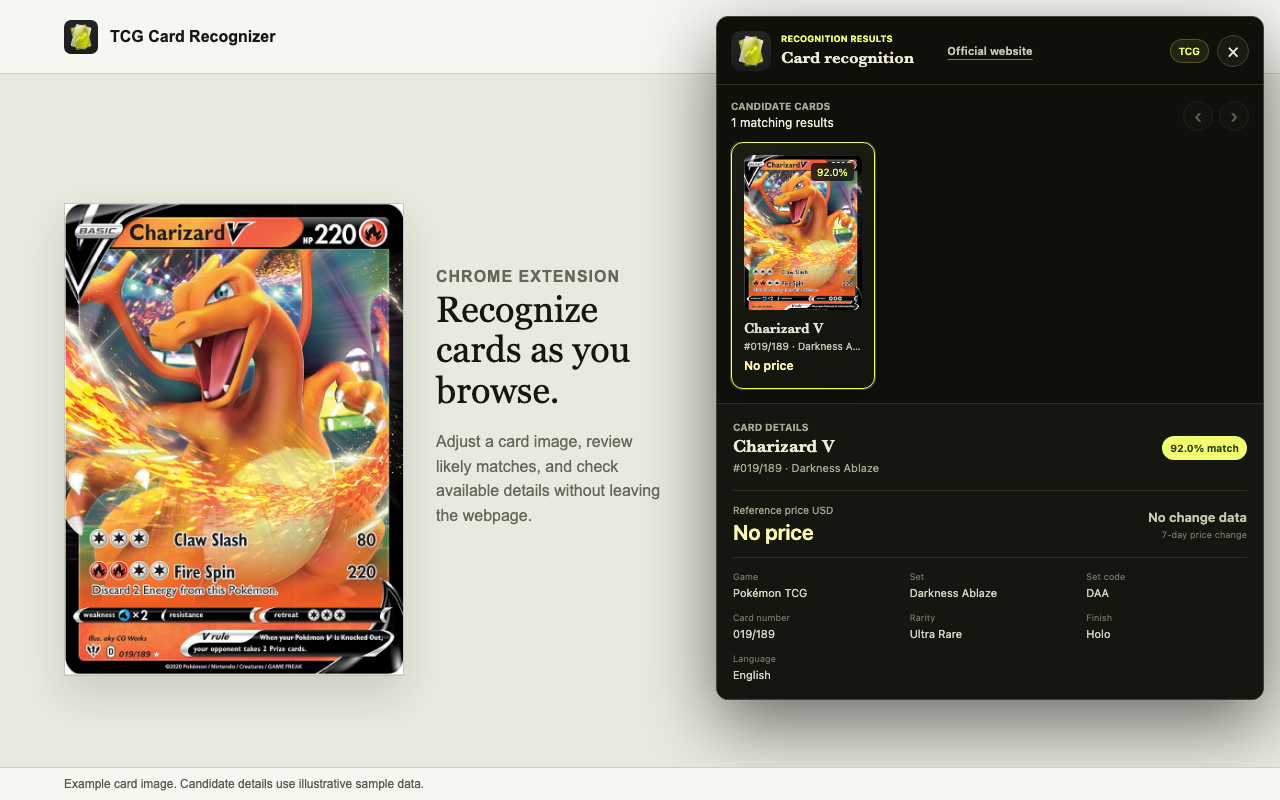
Chrome card recognizer: Chrome extension recognition panel on a webpage with a sample card image

From a web image to candidate cards.

Hover over a card image, choose TCG or Sports Card, adjust the crop, and confirm. The extension extracts an image vector on your device, then shows likely catalog matches and available details on the same page.

Actual extension results panel shown with illustrative sample data. Matches and prices depend on image quality, catalog coverage, and available market data.

Recognize cards on ordinary webpages

When a supported card image is large enough, the extension adds a recognition action beside it. Start from an image you find while browsing instead of saving it and uploading it to a separate scanner.

Choose TCG or sports-card recognition

Select TCG for supported games such as Pokémon, or choose Sports Card for supported sports cards. Coverage depends on the card catalog. Small thumbnails, icons, and avatars are ignored; Chrome internal pages and the Chrome Web Store do not allow the recognition overlay to run.

Adjust the crop and review likely matches

Move the crop corners or edges to fit the card, then confirm. Review the candidate list, match confidence, card details, and any available reference price or price change. A candidate is a suggestion, not a guarantee of the exact printing. Check the set and card number before using a result.

Use a Pokémon checklist for set-level research

The extension can return supported Pokémon card candidates, but it does not provide a complete set checklist. For Pokémon TCG 30th Celebration, use the collector guide to compare the official checklist with a dated CardScanFox catalog and price snapshot. The guide is a separate research page, not a claim that every card in the set is recognized.

Image processing and reference prices

The original image is loaded from its webpage for local processing. The extension extracts a 512-dimensional vector on your device; the recognition service receives the vector and selected card type, not the original image. Online matching needs an internet connection. Prices are references, depend on available data, and are not guaranteed transaction values.

Independent collector tool

TCG Card Recognizer is an independent tool and is not affiliated with, endorsed by, or sponsored by Nintendo, The Pokémon Company, or other trading card publishers. Pokémon and related names are trademarks of their respective owners.

Related

Chrome card recognizer questions.

Does the extension identify the exact card printing?

It returns likely catalog matches. Review the set, card number, language, and finish before using a result; it does not guarantee an exact printing.

Does it work as a Pokémon card scanner?

It can recognize supported Pokémon card images through the TCG option. Results depend on the image and catalog coverage. It does not create or verify a complete Pokémon set checklist.

Does it show card prices?

The results panel shows available reference prices and price changes when present. Some cards may have no price data, and a reference price is not a guaranteed sale price.

Why can I not use it on some images?

The extension needs a sufficiently large card image on a regular webpage. It ignores most small thumbnails, icons, and avatars. Chrome internal pages and the Chrome Web Store block the content script.

Recognize a card on the page you are viewing.

Install TCG Card Recognizer from the Chrome Web Store, then use it on a regular webpage with a supported card image.

View in Chrome Web Store

TCG Card Recognizer for Chrome. Opens in a new tab.